
Version Control, Finally Explained (For Non-Techies)
No more guessing. Learn Git the easy way with real-world examples and zero fluff.


Ever write an incredible piece of literature?
Ever kept writing, aiming to take it even further, but failing miserably?
Ever regretted not having stored that perfect first draft?
Read on.
Version Control is the time machine you need to avoid generating gray hair.
In this article, you will learn the following:
What is version control?
What tools are available?
How to set up your version control system
The main commands for versioning your software.
Before we dive in, make sure you’ve read my previous article on the basics of Continuous Integration and Continuous Delivery:

Also, this tutorial series will be based on the previous Docs-as-Code tutorials (not mandatory):

What is Version Control?
The concept behind version control is straightforward to understand.
You store your product, e.g., code, on a server.
When you change an existing file, your version control system creates a new version of that file. The previous version remains stored on that server, too.
With time, your server will house a whole archive of the same file. This method allows you to retrieve old versions effortlessly.

Virtual Collaboration 1o1
Besides adding safety to your work, version control also supports seamless collaboration.
Imagine two people working on the same chapter of the user manual, not knowing about each other.
Without version control, the first person to save their updates will have their work overwritten by the other person. Uncontrolled, unchecked.
Version control works like this:
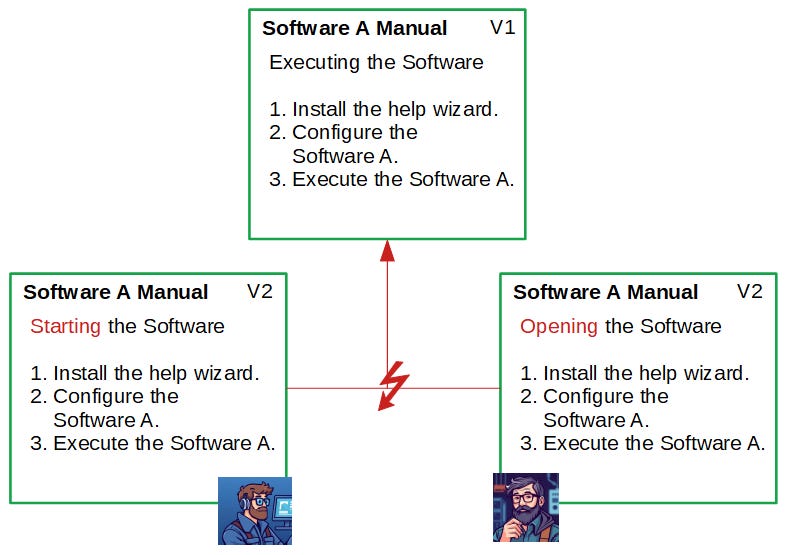
Both Joe and Raphael create a copy of the original chapter from the server on their own computer.
Both update the chapter’s title.
Now they want to overwrite the original chapter with their change.
The version control system will not simply allow them to overwrite the original chapter. Instead, it will display a so-called merge conflict, displaying the conflicting options and the authors of the requested change.
This allows Joe and Raphael to sync up and clarify whose change should be prioritized.
Version control is an incredibly useful tool. Not a single software company on earth can afford to work without one.
